
HopSkipDrive CareDriver
HopSkipDrive, Inc.Business
4.6520.00 Reviews
- Version
- 6.9.6
- Installs
- 500.00K
- Age Rating
- Everyone
Screenshots

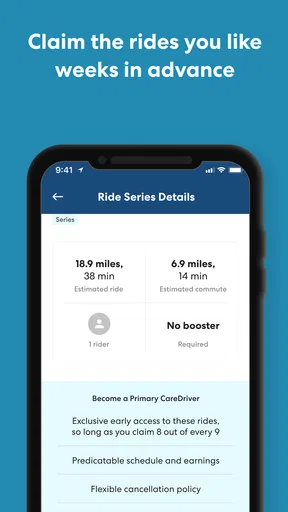
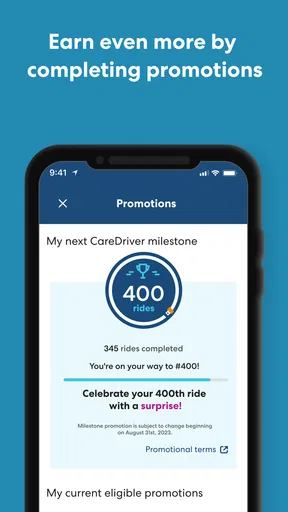
Our Review of HopSkipDrive CareDriver
 Analysis by Appyee
Driving children and young people is a responsibility that demands more than simply getting from one address to another. It involves timing, trust, communication, and the ability to treat each trip as part of someone else’s daily routine. HopSkipDrive CareDriver is built for people who want to take on that kind of driving through a dedicated mobile experience from HopSkipDrive, Inc. I see it as a work-focused tool rather than a general ride-hailing app, and that distinction matters when deciding whether it belongs in your routine.
The application is free and sits in the Business category, with an Everyone age rating. It has reached over 500 thousand installs and holds a 4.6 average from around 4.4 thousand ratings, which suggests that it has attracted a meaningful base of drivers. The current version is 6.9.6, and it requires Android 10 or later. Those details make the first decision fairly simple: this is worth considering if you are eligible to work as a CareDriver and want a purpose-built way to manage that role, but it is not an app I would recommend downloading merely to find ordinary passenger rides.
What to decide before relying on the app
My first question would be whether the CareDriver role fits your schedule and expectations. The app is not valuable in isolation; its usefulness depends on the driving opportunities available to you and on whether the responsibilities of transporting children match the kind of work you want. Someone looking for casual adult ride requests may be better served by a conventional ride-hailing platform. Someone who already understands the importance of dependable school or activity transportation will find the purpose much clearer.
I would also look at the practical side before switching from another work app. Can your phone run Android 10 or newer? Are you comfortable using a business-oriented app while managing time-sensitive trips? Do you want work connected to youth transportation rather than a broad marketplace of unrelated rides? These are more important questions than the download size or the presence of a polished interface, because the central issue is fit, not novelty.
A useful way to think about the application is as one part of a larger driving workflow. You still need to plan your day, keep your vehicle ready, allow time for unexpected delays, and communicate appropriately. The app can support the work, but it cannot remove the human judgment required when a child is waiting, a school day changes, or traffic disrupts the original plan. The strongest reason to choose it is role alignment, not convenience alone.
How I would judge it in daily use
I would evaluate the app on four practical points: how easily I can understand the work available to me, how clearly I can keep track of commitments, how much attention it demands while I am driving, and whether it helps me feel organized before a trip begins. A driver app can be technically functional and still be tiring if it forces too much checking, makes important information hard to find, or encourages rushed decisions.
For a CareDriver, preparation is especially important. I would check upcoming commitments before leaving home, review the day as a whole instead of looking only at the next trip, and keep a buffer around school or activity schedules. That habit is a concrete advantage of using a dedicated business tool: it encourages me to treat transportation as planned work rather than as a stream of spontaneous requests.
There is also a trust dimension that changes the way I use it. With ordinary ride-hailing, I may think mainly about pickup location, destination, and earnings. With child transportation, I would pay closer attention to timing, identity, communication, and the possibility that a trip may require patience. The app’s purpose makes those considerations central, even when the screen itself looks familiar to anyone who has used a driver platform before.
Where the dedicated approach works well
The biggest strength is focus. HopSkipDrive CareDriver is not trying to be a universal marketplace for every kind of journey. Its identity is tied to the CareDriver role, so the experience makes more sense for a person who wants transportation work connected to children and families. That focus can be reassuring when compared with a general app where school-related driving is simply one request type among many.
I also appreciate the professional framing. Calling the user a CareDriver emphasizes that the work involves care as well as driving. That is not just a friendly label; it changes the standard I would set for myself. I would be more deliberate about arriving prepared, keeping communication calm, and avoiding the temptation to treat every trip as a quick transaction.
Another useful insight is that a specialist app can reduce mental switching. If your driving work is centered on one kind of service, you do not have to constantly reinterpret different categories of requests. You can build a repeatable routine around checking the day, preparing the vehicle, confirming the route, and completing the trip responsibly. That consistency is valuable for anyone who prefers predictable professional habits over the variety of a general gig platform.
The app’s business category also gives a clear signal about its intended use. I would not approach it as a lifestyle app or a casual community tool. It belongs in the same practical folder as work scheduling and driver-management tools, and I would judge it by whether it helps me complete transportation commitments reliably. That mindset prevents disappointment caused by expecting entertainment, social features, or broad ride discovery.
A realistic day with CareDriver
Imagine that I have several school-related trips arranged across an afternoon. Before leaving, I open the app to orient myself around the workday rather than immediately heading to the first pickup. I want to understand the sequence, identify where the tightest timing may occur, and decide when I need to leave room for traffic or a delayed handoff. That planning step is where a dedicated driver application can be more useful than a basic calendar reminder.
During the day, I would keep the phone interaction limited to safe moments. I would not try to read details while moving, and I would prepare navigation before setting off. If a delay appears, the right response is not to drive aggressively; it is to follow the appropriate communication process and keep the child’s safety ahead of the schedule. The app may sit at the center of the workflow, but responsible use means the screen never becomes the priority.
After completing the trips, I would use the app as a record of the workday and then make a quick note of anything that could affect future planning, such as a difficult pickup location or a recurring traffic problem. This is a non-obvious benefit of treating the service professionally: the most useful information is not always a button inside the app. A consistent review of your own routine can make later shifts calmer and more dependable.
Small habits that make the experience better
My first practical tip is to check the entire day before accepting or committing to additional work. A single trip can look manageable on its own while creating a difficult gap before the next responsibility. Looking at the broader schedule helps prevent overbooking and makes it easier to protect the punctuality that families expect.
Second, I would separate app preparation from navigation preparation. The CareDriver app may organize the work, but a driver still needs to know where the vehicle is going and how long the route is likely to take. I would review the route while parked, account for school traffic, and avoid making last-second decisions at the curb. This two-step habit is more reliable than assuming one app can handle every part of the journey.
Third, I would keep a simple personal checklist for the vehicle and the start of each trip. The exact checklist will depend on the driver’s circumstances, but the principle is useful: repeat the same safety and readiness steps instead of relying on memory when the day becomes busy. A specialist platform is most effective when paired with disciplined habits outside the screen.
Finally, I would treat updates seriously. The current release is 6.9.6, and the app requires Android 10 or later. I would keep the application and operating system current when possible, not because every update guarantees a dramatic change, but because work apps need to remain compatible and dependable. If your phone cannot meet the minimum system requirement, that is a practical reason to reconsider the device or choose another work arrangement before building your schedule around it.
Where a different category may fit better
There are clear situations in which I would choose something else. If I wanted broad access to adult passengers, flexible on-demand requests, or a platform designed around general ride-hailing, a mainstream driver app would likely be a better match. Its wider audience and familiar model may suit someone who does not want to specialize in youth transportation.
If I were arranging transportation for my own family rather than working as a driver, I would also look for a service designed for parents, schools, or organizations. The CareDriver application is aimed at the person providing the transportation, so using it from the wrong perspective could create confusion about what the app is meant to accomplish.
A personal calendar or notes app may still be useful alongside it, especially for drivers who manage several kinds of commitments. I would not expect one specialist tool to replace every planning method. In fact, a calendar can help with non-driving obligations while CareDriver remains focused on the business side of the transportation work. The trade-off is an extra step, but that separation may be safer than forcing unrelated tasks into one place.
Another limitation is specialization itself. A focused platform can feel less attractive if your priority is maximum variety. You may prefer a general marketplace when demand changes from day to day or when you want to combine different types of driving. CareDriver makes more sense when the service it represents is the reason you are opening the app in the first place.
The cost of changing your routine
Switching to a dedicated driver app is not only a matter of installing it. I would need to learn its workflow, adjust how I review my day, and decide which existing tools remain useful. That learning curve is probably manageable, but it still has a cost in attention. For a driver already comfortable with another platform, the question is whether the specialized role justifies changing established habits.
The free price removes one obvious barrier, but it does not make the decision effortless. Your real investment is time, vehicle readiness, schedule discipline, and the responsibility attached to transporting young passengers. I would therefore judge the app by the quality of the work arrangement around it rather than by the absence of a download charge.
There is also a transition risk. During the first few workdays, I would avoid planning an overly tight schedule while learning where information appears and how the app fits with navigation and communication. A cautious start gives me room to understand the process without letting unfamiliarity affect a child’s pickup or drop-off. That is a much better approach than switching platforms immediately before an important day.
For someone already using a general driver service, I would compare the two workflows on paper: how each supports the type of trips you want, how much schedule control you have, and whether the specialist focus improves your confidence. Do not switch simply because a dedicated name sounds more professional. Switch when the actual transportation role is the work you want to do.
Who should install it
I would recommend HopSkipDrive CareDriver to an eligible driver who wants a focused business app for youth transportation and is comfortable taking the role seriously. It is especially suitable for someone who values planned work, repeatable routines, and the care responsibilities that come with moving children between important parts of their day.
I would be more cautious for a person seeking casual income without a strong interest in this specific type of driving. The app’s purpose is too specialized to be a sensible first choice for general ride-hailing. I would also hesitate if your phone runs an older version of Android, since the minimum requirement is Android 10, or if you dislike managing scheduled commitments rather than accepting whatever request appears next.
The public response is encouraging: the app has around 520 written reviews in addition to its ratings, and its overall score is 4.6. I treat that as a useful sign of adoption rather than a guarantee that every driver will have the same experience. Your local availability, schedule, and comfort with the responsibility of the role will matter more than a number on a store page.
My recommendation after weighing the trade-offs
My recommendation is straightforward: choose it when you want to be a CareDriver, not merely when you want any driving app. The dedicated purpose is its main advantage, and it also defines its limits. I like the way that focus encourages a more organized and responsible approach to transportation, but I would not pretend it replaces general ride-hailing services, personal planning tools, or good judgment behind the wheel.
For the right user, the free app is a sensible starting point. Install it on a compatible device, learn the workflow while parked, review complete schedules before committing, and give yourself more time than the bare route estimate suggests. Those habits will determine the quality of the experience more than repeatedly checking the screen.
HopSkipDrive, Inc. has positioned this as a practical tool for a specific kind of work, and that clarity is valuable. I would recommend it to drivers who want that specialization and are prepared for the care component of the job. If your needs are broader, a general transportation platform may fit better. If your needs are family-side rather than driver-side, look for an app built around arranging rides. In its intended lane, however, this is a focused choice for turning youth transportation commitments into a more organized driving routine.
Verdict
Strengths of HopSkipDrive CareDriver
- Flexible driving opportunities for approved caregivers.
- Designed around scheduled rides for children and families.
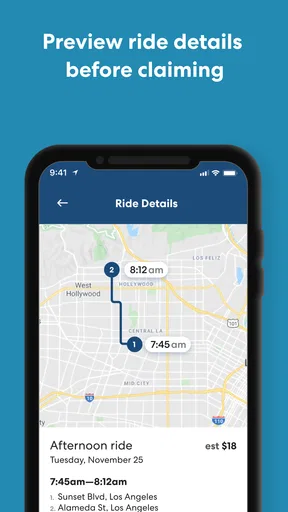
- Clear trip details can help with planning ahead.
- May provide meaningful work supporting children’s transportation.
- CareDriver community can offer practical support and guidance.
Limitations of HopSkipDrive CareDriver
- Strict screening and approval requirements may limit eligibility.
- Ride availability can vary significantly by location and demand.
- Drivers may need to manage child-safety responsibilities carefully.
- Scheduled trips may involve waiting or unexpected timing changes.
- Earnings can be affected by distance, cancellations, and unpaid downtime.
Similar Picks in This Category
View All
LinkedIn: Community & Network
LinkedIn3.8

Zoom Workplace
zoom.com4.1

Microsoft Teams
Microsoft Corporation4.6

Meta Business Suite
Meta Platforms, Inc.4.6

Webex Meetings
Cisco Systems, Inc.4.5

TeamViewer Remote Control
TeamViewer4.4
Frequently Asked Questions
What is HopSkipDrive CareDriver, and how does it work?
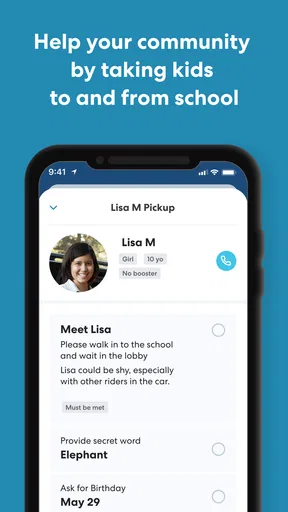
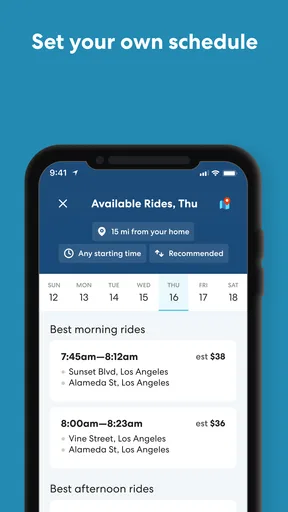
HopSkipDrive CareDriver is a transportation platform for approved caregivers who drive children and other qualified riders to scheduled activities, appointments, school programs, or community services. After completing the application and screening process, drivers can view eligible ride opportunities, accept trips that fit their availability, and use the app for navigation, pickup details, communication, and ride-status updates.
Who can become a CareDriver, and what requirements must applicants meet?
CareDriver eligibility depends on the requirements in your service area, but applicants generally need to meet minimum age and driving-experience standards, have a suitable vehicle, hold a valid driver’s license and insurance, and pass background and driving-record checks. Because drivers transport children and vulnerable riders, HopSkipDrive may also require vehicle inspections, safety training, identity verification, and additional documentation before approval.
Is HopSkipDrive CareDriver available everywhere?
No. HopSkipDrive operates only in selected cities and regions, so availability should be confirmed before starting an application. Ride opportunities also depend on local demand, school and agency partnerships, and your approved service area. Even if the app can be downloaded in your location, that does not necessarily mean you can register or receive trips there.
How much can CareDrivers earn, and when are payments made?
Earnings vary according to the market, trip distance, timing, ride requirements, and the number of opportunities available. The app may show compensation details before you accept a ride, allowing you to decide whether it fits your schedule and vehicle costs. Drivers should review current payment policies carefully, including payment timing, cancellation rules, taxes, fuel, insurance, and other expenses.
What safety features and support does HopSkipDrive provide?
Safety is a central part of the CareDriver experience. The platform uses driver screening, ride details, pickup and drop-off instructions, trip tracking, and communication tools designed for scheduled transportation. Drivers should carefully follow identification and handoff procedures, remain attentive to special instructions, and contact support whenever a rider, pickup location, schedule, or safety situation does not match the information shown in the app.
